To build a DevTools content plan, choose a customer use case, define the company and reader, and map their questions across six stages: Awareness, Exploration, Evaluation, Validation, Adoption and Expansion. For each stage, plan an asset with a specific title, format and next action. Start with the example below.
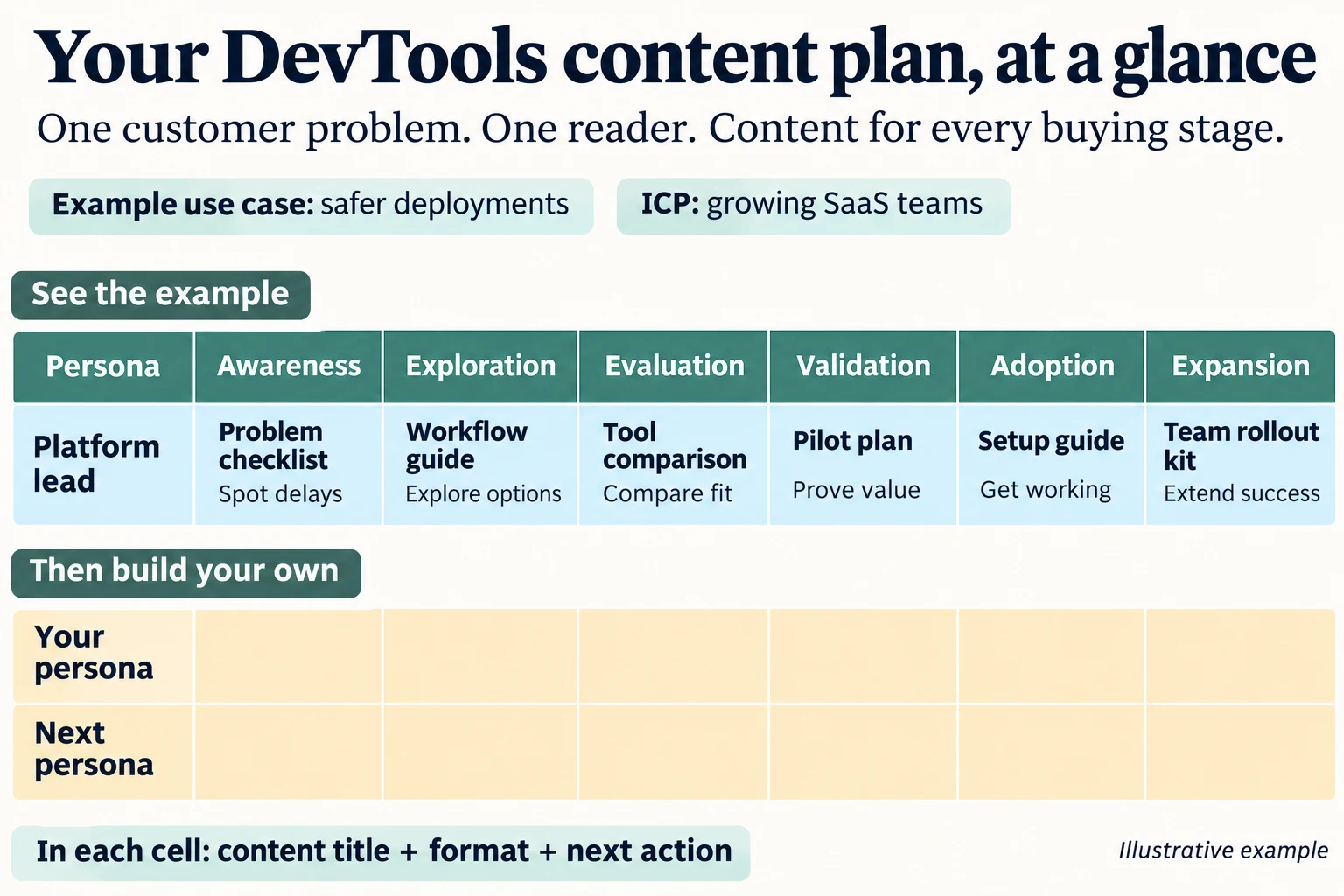
One use case, one reader, six buying stages. The filled row shows the kinds of content you could create; the blank rows are for your own plan. This is an illustrative example, not a screenshot of the workbook.
For the platform lead in this example, a problem checklist helps identify deployment delays. A workflow guide explains possible approaches. A tool comparison supports evaluation. A pilot plan helps prove value. Setup instructions support adoption, and a rollout kit helps another team get started.
That is what you are building: a plan for answering the questions that matter to the people who might use, recommend or buy your product.
The editable Excel workbook at the end includes a completed example, a blank planning matrix and detailed content guides. First, let’s walk through how to make the plan useful.
What is a DevTools content plan?
A DevTools content plan maps developer and buyer questions to useful content for a specific technical use case. It identifies who each asset helps, the decision it supports, what to write and what the reader should do next.
When used for account-based marketing, or ABM, the plan also connects content to the needs of a defined group of target accounts and the people involved in their buying decisions.
Four things shape the plan:
| Planning input | What it means | Deployment-platform example |
|---|---|---|
| Use case | The customer job or problem | Reduce deployment maintenance while keeping releases reliable |
| Ideal customer profile, or ICP | The kind of company that needs help | A growing SaaS business with multiple services and an established platform team |
| Persona | The person reading or using the content | Platform engineer, platform lead or VP Engineering |
| Buying stage | The decision that person is making now | Understand the problem, explore, compare, prove, implement or expand |
A content calendar adds dates, owners and publishing schedules to the assets you select. Build this planning matrix first so those publishing decisions have a clear purpose.
1. Choose a customer use case
Start with a job your customer needs to accomplish. Make it specific enough that you can describe the workflow and what goes wrong.
Useful DevTools use cases include:
- Reduce the manual work involved in deploying a service.
- Coordinate incident response across a growing engineering team.
- Investigate production problems using connected telemetry.
- Deliver customer integrations without overwhelming the roadmap.
- Give distributed developers access to the resources they need.
“Improve developer productivity” is a broad ambition. “Reduce the time platform engineers spend maintaining deployment pipelines” gives you people, tasks and problems to investigate.
Ask customers about the last time they did the job:
- What were they trying to achieve?
- Where did the work slow down or fail?
- What workaround did they use?
- Who had to get involved?
- What made the problem urgent?
Use sales calls, support requests, onboarding sessions and interviews as inputs. Record the language customers use and look for recurring situations.
The Merge case study describes how its founders used discovery conversations to understand integration problems and identify buyers. The transferable practice is to learn the problem before choosing the message.
Write this in your template: “Help a growing platform team reduce deployment maintenance without losing control over releases.”
2. Separate the company profile from the reader
Your ICP describes the company. Your persona describes the person.
For example, your company profile might be a B2B SaaS business with several services, a platform team and increasing CI/CD maintenance. CI/CD refers to continuous integration and continuous delivery or deployment.
Within that company, different people need different explanations:
| Reader | Main question | Content angle |
|---|---|---|
| Platform engineer | How does this work, and what might break? | Configuration, integrations, failure modes and debugging |
| Platform lead | How would our team adopt and operate this? | Migration effort, standards, ownership and ongoing maintenance |
| VP Engineering | Does the improvement justify the investment? | Engineering capacity, release risk, implementation cost and evidence |
Create separate rows when those people need meaningfully different answers. Keep the same use case across the rows, then adapt the content to each reader.
One pilot can support several assets: an implementation guide for engineers, a rollout checklist for the team lead and a decision summary for the approver. You do not need completely separate research for every persona.
The Merge case study also describes learning that people experiencing integration pain were not always the people able to approve a purchase. A useful plan accounts for both.
Write this in your template: the account profile, followed by a row for each relevant reader.
3. Map content to the six buying stages
Use the question the reader is trying to answer to choose the stage. A webinar, article or demo can serve different stages depending on its purpose, evidence and call to action.
The six-stage model below is the framework used in this playbook. Buyers can return to earlier questions, and people in the same account can be at different stages.
| Stage | Buyer question | Useful content types | Suggested next action |
|---|---|---|---|
| Awareness | Is this problem worth addressing? | Diagnostic checklist, problem explainer, research commentary | Audit the current workflow |
| Exploration | What approaches could solve it? | Tutorial, architecture guide, workflow demo | Try a small example |
| Evaluation | Which option fits our requirements? | Comparison, build-versus-buy guide, cost worksheet | Compare against agreed criteria |
| Validation | Will this work here, and can we justify it? | Pilot plan, customer proof, security pack, business case | Agree the test and approval criteria |
| Adoption | How do we get working and keep using it? | Quickstart, onboarding guide, runbook, office hours | Complete one verified real task |
| Expansion | Where should we use this next? | Value review, rollout kit, advanced-use-case guide | Test another suitable team or workload |
The following headlines are suggested examples. They are not presented as headlines published by the companies cited.
Awareness content: help the reader recognize the problem
Awareness content helps someone identify a problem, understand its consequences and decide whether to investigate it.
Suggested asset: a diagnostic checklist called “Where release time disappears before production.”
Ask readers to examine their recent deployments. Separate approval waits, failed runs, repeated manual steps and pipeline maintenance. Show how these delays appear in a real workflow.
Use this outline:
- Open with a recognizable deployment problem.
- Explain the main sources of delay.
- Show a clearly labeled example timeline.
- Give readers a checklist for reviewing their own process.
- Ask them to map one recent deployment.
Gather actual timestamps or permissioned examples if you make claims about time spent. Label invented scenarios as illustrative.
The incident.io case study describes a startup incident-management guide covering severity, roles, coordination, communication and follow-up. It is a useful model for teaching a job in a way readers can apply.
Call to action: “Map your last deployment.”
Exploration content: explain the available approaches
Exploration content helps readers understand different ways to solve a problem and what each approach requires.
Suggested asset: an architecture guide called “Three ways to reduce deployment toil in a growing team.”
Compare improving scripts, introducing self-managed orchestration and using a managed delivery platform. Explain how each approach works, what the team needs to implement it and what ongoing work remains.
Include a small diagram or runnable example. State prerequisites, supported versions and limitations. Explain when each option is appropriate.
The Grafana Labs case study describes interoperability with tools customers already used. That suggests a useful content question: how can you demonstrate a new workflow within the reader’s existing environment?
Call to action: “Run the sandbox example.”
Evaluation content: make the trade-offs clear
Evaluation content helps a buyer compare options against their requirements, constraints and costs.
Suggested asset: a comparison called “Self-managed CI/CD or a managed platform: a team-level comparison.”
Cover setup, maintenance, required skills, integrations, governance, migration and total cost. Include the work involved in switching and the situations where each option fits.
Use the same workload or scenario to compare alternatives. Date technical claims and link to the documentation supporting them. If you publish a benchmark, explain the environment, configuration and limitations.
The Harness case study describes a comparison that originated in customer requests for material they could use in internal buying discussions.
Ask yourself: could a champion forward this piece to a colleague and use it to discuss the decision?
Call to action: “Complete the comparison worksheet.”
Validation content: help the buyer prove the choice
Validation content helps buyers test the preferred solution in their own situation and gather the evidence needed for approval.
Suggested asset: a pilot plan called “Prove delivery improvement on one service before rollout.”
Specify the service, current baseline, desired improvement, test procedure, owner, required evidence and approvers. Define what a successful or unsuccessful result would look like before starting the test.
Include technical objections and organizational requirements. A working demonstration might still leave unanswered questions about security, migration, support or cost.
Harness’s case study also describes discussing measurable before-and-after outcomes during sales. Apply that principle by helping the buyer assess their own result. Separate measured pilot outcomes from estimated annual value.
Call to action: “Approve the pilot success criteria.”
Adoption content: help the customer reach repeat value
Adoption content helps customers implement the product, complete their first useful task and repeat it successfully.
Suggested asset: a quickstart called “Your first production deployment with a tested rollback.”
Include prerequisites, exact steps, expected results, verification checks, common failures and a recovery path. Explain who owns the workflow and where to get help.
Define success in terms of the customer’s job. Installation or attendance at training may be milestones, but the customer still needs to accomplish something useful.
The Linear case study describes selecting early users whose needs matched the product and learning through focused iterations. Apply that discipline to onboarding: state who the workflow supports and fix recurring setup blockers.
Call to action: “Complete one verified deployment.”
Expansion content: connect proven value to the next need
Expansion content helps an existing customer decide whether to extend successful use to another team, workload or requirement.
Suggested asset: a value review called “What changed after the pilot, and which service should follow?”
Start with actual results and unresolved problems. Identify the next suitable workload, its owner, additional requirements and a limited test. Explain why the next step follows from the value already delivered.
The Datadog case study describes expansion through increased use, additional products and broader adoption. The Tailscale case study illustrates how individual utility can develop into organizational needs for administration, controls and support.
Use those changes in customer needs to guide the content you create.
Call to action: “Nominate the next service owner.”
4. Write a brief before producing the asset
A content brief turns an idea into instructions someone can execute. It should identify the reader, their question, the explanation required and the evidence needed.
For each selected asset, record:
| Field | What to write |
|---|---|
| Use case and ICP | The customer job and company situation |
| Primary reader | The person whose question you are answering |
| Buying stage | The decision they are making now |
| Buyer question | One question the content must resolve |
| Format and headline | The asset type and specific working title |
| Outline | The steps, criteria or explanations in a useful sequence |
| Evidence | Interviews, tested instructions, examples, data and sources |
| Call to action | One appropriate next step |
| Distribution | Where the reader will encounter it and who will share it |
| Owner and reviewer | Who writes it and who checks the claims |
| Success measure | The behavior that would indicate it helped |
For technical material, involve someone who can test the instructions and evaluate the trade-offs.
The PostHog case study describes developer involvement in marketing and technical review. The Supabase case study describes feature builders writing explanations and preparing coordinated launch material. These are useful practices to incorporate into your production process.
5. Decide which content to create first
Prioritize content where a recurring buyer question intersects with an important use case and a visible gap in your existing material.
Look for a question that repeatedly appears in sales, an objection delaying evaluations or an onboarding problem preventing first value. Check whether an existing asset can be improved before creating a new one.
For a small team, start with a connected set for one audience. A problem diagnostic, an options guide and a pilot plan can support related decisions. Add onboarding material when customers begin using the workflow.
You do not have to fill every matrix cell before publishing. Blank cells show where you have no recorded idea or asset; they are prompts for investigation, not automatic production priorities.
In the workbook, Planned coverage counts stage cells with an entry. Live coverage counts stage cells beginning with “Live:”. Neither calculation measures accuracy, usefulness or commercial impact.
6. Choose distribution channels before publishing
Choose channels based on where the intended reader encounters the problem and who can put useful content in front of them.
A tutorial might belong in documentation, a repository, an engineering newsletter or a relevant community. A comparison may be valuable in a sales follow-up. A validation pack may need to reach a champion, evaluator and approver. An onboarding guide may work best through the product or customer success.
The Rippling case study describes testing outbound approaches and building relationships with trusted partners. Rippling is an adjacent B2B SaaS example, rather than a DevTool. The transferable lesson is to define the audience and distribution route before scaling activity.
For each asset, answer: “Who will share this, with whom, and in what situation?”
7. Measure whether the content helped
Measure content against the decision or behavior it is intended to support.
| Stage | Useful signals to review |
|---|---|
| Awareness | Relevant account engagement, diagnostic use and problem-focused replies |
| Exploration | Tutorial completion, relevant technical questions and use-case conversations |
| Evaluation | Qualified evaluations, comparison use in deals and shortlist inclusion |
| Validation | Completed pilots, resolved objections and approval progression |
| Adoption | Time to first value, successful setup and repeat use |
| Expansion | Adoption by another team or workload and resulting commercial progression |
Pair usage data with feedback from sales, support, customer success and customers. Ask which questions remain unanswered and where readers get stuck.
Pageviews describe reach. They do not establish that someone is ready to buy. Likewise, an asset associated with an opportunity is not, by itself, proof that the asset caused that opportunity.
Common questions about DevTools content planning
What is an ABM content matrix?
An ABM content matrix maps a target account’s use cases and buyer personas to content across buying stages. Each cell identifies an asset that helps a particular person understand a problem, compare options, validate a choice, adopt a product or expand its use.
What is the difference between an ICP and a persona?
An ICP describes the kind of company you serve, including its situation, workflow and constraints. A persona describes a person within that company, such as a developer, platform lead or engineering executive. One account profile can contain several relevant personas.
How do I choose the stage for a piece of content?
Choose the stage from the question the content answers and the next action it supports. A webinar explaining available approaches fits Exploration. A webinar reviewing pilot results for approval fits Validation. The format alone does not determine the stage.
How are evaluation and validation different?
Evaluation compares alternatives against requirements. Validation tests the preferred option in the buyer’s environment and builds confidence for approval. Comparisons and cost worksheets support evaluation; pilot results, security evidence and decision memos support validation.
Do I need a separate asset for every persona?
Create separate assets when the reader’s question or evidence needs are materially different. Otherwise, adapt sections, summaries or distribution messages from shared research. One implementation can support a technical guide, a team rollout checklist and an executive summary.
What should a small DevTools team publish first?
Start with a recurring customer question that affects a valuable use case. Choose a small connected set of assets for the relevant reader, reuse existing research and prioritize gaps that are slowing discovery, evaluation or adoption.
Download the DevTools content planning template
Use the workbook to turn this process into your own plan. Start with the completed example on the first sheet, then replace the placeholders in the blank matrix.
The workbook contains nine sheets:
- Main Template: a completed example followed by six use cases, three persona rows per use case and six buying-stage columns.
- How to Use: a column-by-column walkthrough of one planning row.
- Framework: explanations of the concepts and stage boundaries.
- Awareness: content that helps readers recognize a problem.
- Exploration: content that helps readers understand approaches.
- Evaluation: content that helps readers compare choices.
- Validation: content that helps readers prove and approve a solution.
- Adoption: content that helps customers get working and repeat value.
- Expansion: content that helps customers extend successful use.
The stage guides include 36 detailed DevTools content examples and a general SaaS example for each stage. They cover writing prompts, suggested headlines, persona angles, channels, calls to action and real-world practices from ten First Principles case studies.
Suggested headlines and execution ideas are distinguished from documented company practices, with source URLs included. The completed spreadsheet example uses employee onboarding to make the structure approachable across B2B SaaS; the opening graphic uses safer deployments to show its DevTools application.
Download the editable Excel content planning workbook
Choose one use case, one reader and one buyer question. Fill that cell, use the relevant stage guide to develop the brief, and build from there.